


SMC Insurance
Welcome to SMC.
How may I assist you?
by on Monday, 17 November 2025
| Last Updated on Wednesday, 10 June 2026


.png)
You cannot directly transfer your FASTag from one bank to another. The only way to change your FASTag bank in India is to deactivate your current tag, wait for a balance and security deposit refund (7–15 working days), and apply for a fresh FASTag from your preferred bank or via the IHMCL portal (fastag.ihmcl.com). The full process typically takes 2 to 3 weeks.
Switching your FASTag from one bank to another might sound simple, but it can get confusing once you start. Each bank has its own process, and missing one small step can lead to blocked tags or failed toll payments. Have you ever been stuck at a booth with your FASTag showing “inactive” for no clear reason? That usually happens when the tag isn’t properly transferred or closed.
FASTag is linked not just to your name, but also to your vehicle and the bank that issued it. So if you’ve changed your bank, bought a new car, or just want to move to a provider with better offers, updating your FASTag becomes necessary. It keeps your payments smooth and avoids double deductions.
In the guide below, you’ll find how to change or transfer your FASTag to another bank step by step, along with a few small tips that can save you time and effort.
If you’ve driven on Indian highways in recent years, you already know about the small sticker on windshields that speeds up toll payments - the FASTag. Linked directly to your bank account or prepaid wallet, it uses RFID technology to deduct toll charges automatically as your vehicle passes through the plaza. No cash, no queues, no delays.
But as convenient as it sounds, many vehicle owners are now finding themselves wanting to switch their FASTag to another bank. And it’s happening more often than you might think.
Banks keep updating their offers, cashback programs, and service benefits. Some drivers switch because another bank provides faster recharge options or better integration with mobile apps. Others make the change when they close an old account or face issues with customer service. Whatever the reason, transferring your FASTag can save time, reduce confusion, and help you manage toll expenses more efficiently.
In this article, we’ll take you through how the FASTag system works, why transferring it between banks isn’t always straightforward, and what you should check before starting the process.
To understand the transfer process, it helps to know how FASTags actually function. Each FASTag is linked to a specific bank or payment service provider. When you pass through a toll booth, sensors read your tag and deduct the toll amount directly from the linked account.
Now, there are two main types of FASTags: those issued by individual banks and those issued by the National Highways Authority of India (NHAI). NHAI’s version is slightly different because it’s not tied to a specific bank; instead, it’s managed through the NHAI prepaid wallet. Bank-issued tags, on the other hand, are tied directly to your savings account or prepaid balance with that particular bank.
This link is what makes transferring between banks tricky. You can’t
simply move your existing tag to another bank’s account. The current FASTag must be closed, and a new one has to
be issued by the bank you’re switching to. It’s not exactly complicated, but knowing this in advance helps
you avoid unnecessary delays or duplicate charges.
Before starting the transfer, it’s important to do a quick review of your current FASTag account:
The most straightforward way to switch your FASTag from one bank to another is to close your old tag and apply for a new one. It takes a little time, but it ensures a clean transition without any mix-ups. Here’s the step-by-step process to close the old tag:
If you prefer not to deal directly with a bank’s portal, you can use the official IHMCL (Indian Highways Management Company Limited) website, which operates under NHAI. It’s a government-managed platform that lets you purchase and manage your FASTag through partner banks participating in the NETC system.
The IHMCL portal connects you to several authorised issuing banks. It allows you to apply for a new FASTag, check your application status, and manage your account information. However, it doesn’t directly transfer an existing FASTag from one bank to another. You must still close your old tag before applying for a new one through IHMCL.
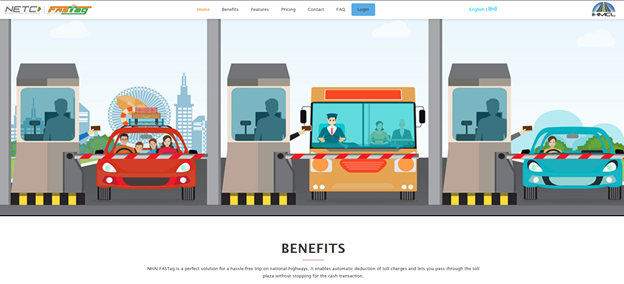
This approach starts a new one cleanly, while giving you more control over where and how your FASTag is managed. Thus, using the IHMCL portal gives you flexibility. You can easily change banks later, keep track of toll transactions in one place, and avoid dealing with multiple bank-specific portals. It’s especially helpful if you
plan to manage multiple vehicles or switch banks again in the future.
Step 1: Open the Paytm app and click on the FASTag section. You will then find the “Request Closure” option.
Step 2: Your remaining wallet balance will be refunded to your Paytm wallet.
Step 3: Apply for a new FASTag via any NHAI-authorised bank (HDFC, ICICI, SBI, Axis, etc.) or through the IHMCL portal (fastag.ihmcl.com).
Note: Do not apply for a new FASTag before your Paytm tag is fully closed, to avoid 'One Vehicle, One FASTag'
conflicts.
Now that you know your options, here’s how to transfer your FASTag account smoothly.
Even when you follow all the right steps, a few bumps can show up along the way. Knowing what to expect (and how to fix it) saves you time and frustration.
A smooth transfer princess is possible when being careful with the small details:
These small steps go a long way in preventing mix-ups and saving time later.
Transferring your FASTag doesn’t have to be complicated. The key is to close your old tag properly, wait for confirmation, and then apply for a new one with your preferred bank or through the IHMCL portal. Proper closure and reissuance keep your account records clean, prevent duplicate charges, and ensure your vehicle remains compliant with NHAI and NPCI regulations.
At SMC Insurance, we believe that managing your vehicle should feel simple and secure. Staying informed about how FASTag transfers work helps you stay on top of your finances and enjoy a smoother journey every time you hit the road.
Disclaimer: The information provided on this platform is intended for general awareness and educational purposes. While every effort is made to ensure accuracy, some details may change with policy updates, regulatory revisions, or insurer-specific modifications. Readers should verify current terms and conditions directly with relevant insurers or through professional consultation before making any decision.
All views and analyses presented are based on publicly available data, internal research, and other sources considered reliable at the time of writing. These do not constitute professional advice, recommendations, or guarantees of any product’s performance. Readers are encouraged to assess the information independently and seek qualified guidance suited to their individual requirements. Customers are advised to review official sales brochures, policy documents, and disclosures before proceeding with any purchase or commitment.
No, FASTags are linked to the registered owner of the vehicle. If the ownership changes, the new owner must close the old tag and apply for a new one under their name and KYC details.
Usually within 1-3 business days, though some banks may take up to three days. You’ll receive a confirmation once it’s ready to use.
The remaining balance from your old FASTag account is refunded to your linked bank account or prepaid wallet after closure. The timeline depends on your bank’s process, typically within seven working days.
No, FASTags are tied to specific banks. If you switch banks, you’ll need to close the old tag and apply for a new one with the new provider.
SMC Insurance Brokers Pvt. Ltd.
SMC Metro Mall, Near Pratap Nagar Metro Station, Pratap Nagar, New Delhi-110007
Registration No: 289, Registration Code No: IRDAI/DB-272/04/289, Valid till: 27/01/2029, License category: Composite Broker, CIN: U66000DL1995PTC172311
Insurance is the subject matter of solicitation.
Visitors are hereby informed that their information submitted on the website may be shared with insurers.
Product information is authentic and solely based on the information received from the Insurer.
